
FairStars Audio Converter is a media file conversion tool to convert WAV, RealMedia (RM, RA, RMVB, RMJ), AIFF, AU, Creative VOC, PVF, PAF, Amiga IFF/SVX, APE, FLAC, OGG, VQF, MP1, MP2, MP3, WMA, WMV, ASF, MP4, M4A, M4B, AAC to WMA, MP3, AAC, VQF, OGG, FLAC, APE, and WAV formats. You can convert multiple files in a single batch, regardless of their source and target formats. In addition, the program includes a built-in player. The audio format conversions are performed without any temporary files, allowing high conversion speeds. Other features include normalization (adjust volume), support for ID3 tags and more.
Main features:
- Convert WAV, RealMedia (RM, RA, RAM, RMJ, RMVB), AIFF, AU, Creative VOC, PVF, PAF, Amiga IFF/SVX, APE, FLAC, OGG, VQF, MP1, MP2, MP3, WMA, WMV, ASF, MP4, M4A, M4B, AAC to WMA, MP3, AAC, VQF, OGG, FLAC, APE, WAV formats with different settings.
- Fast Conversion Speed: audio format conversion is performed directly without any temporary files, and thus enables high converting speed and economy of hard disk resource.
- Batch audio files conversion:You can convert many files in one batch regardless of their source formats.
- Support automatic volume adjustment (normalization) when converting.
- Support automatic saving ID3 Tags when converting, and also support ID3 tags display and edit.
- Playback of Popular Music Formats: support WAV, RealMedia (RM, RA, RAM, RMJ, RMVB), AIFF, AU, Creative VOC, PVF, PAF, Amiga IFF/SVX, APE, FLAC, OGG, VQF, MP1, MP2, MP3, WMA, WMV, ASF, MP4, AAC files with its built-in player.
- Support Drag and Drop:supports dragging and dropping files or folders from the File Explorer into the window of FairStars Audio Converter.
- Explorer-like file input dialog: allows you to navigate through supported files on your computer and add them to File List easily and quickly.
- Easy-to-use user-friendly interface.
Changes in Version 1.67:
- Adds MP4/AAC support for Tag Editor, and corrects the error that mp3 tag cannot be saved.
Download: http://rapidshare.com/files/124851911/FairStars_Audio_Converter_1.67.rar

Xilisoft Audio Converter provides an easy and completed way to convert MP4 to MP3, M4A to MP3, AAC to MP3, etc, convert audio between popular audio files, such as WAV, WMA, FLAC, OGG, APE, AAC, MP4, MP3, M4A, MP2, VQF etc.
One of the most featured function of Xilisoft Audio Converter is to convert MP4 to MP3, M4A to MP3 and AAC to MP3. The audio converter supports ID3 tag, all ID3 tags in the original files will be reserved after the audio converting processes. In addition, the audio converter also allows you convert video files including AVI, MPEG, MP4, WMV, ASF etc to popular audio files, e.g. convert MP4 to MP3.
All conversion processes such as MP4 to MP3, M4A to MP3 and AAC to MP3 converting are very easy to handle with super fast speed. Using audio converter, you will get any output formats you want with excellent quality. All encoders and decoders are built-in. Supported OS: Windows 98/ME/NT4/2000/2003/XP and Windows Vista
Features:
• Convert MP4 to MP3, M4A to MP3, AAC to MP3, MP3 to M4A;
• Convert between AAC, MP4, MP3, M4A, WAV, WMA, MP2, VQF, APE, OGG, FLAC;
• Convert video files to audio formats such as AVI, WMV, MPEG, MP4 to MP3;
• The audio converter supports multithreading and batch conversion;
• Copy ID3 tag between audio formats (reserve ID3 tag during conversion);
• When converting to MP3, bitrate, VBR or CBR, stereo or mono are selectable;
• You can select the compression method, sample rate, bitrate, stereo or mono when converting to WAV;
• The MP4 to MP3 converter allows users to select whether delete the original files.
Download: http://rapidshare.com/files/125470350/Xilisoft_Audio_Converter_2.1.69.0627.rar

RaimaRadio allows you to listen to and record radio stations from around the world. While listening to your favorite radio station you can record it anytime you want. Browse through the radio stations or just select a random station and enjoy Internet radio!
You have total control over your radio stations allowing you to add or delete a station anytime you want. Need to play a station from another applicaton then just enable global hotkeys and control it anytime.
Features:
* Listen to and record multiple stations simultaneously
* Create a schedule for automatic recording
* Show cover art and lyrics for each song
* Save tag information to music files
* Ability to add more stations
* Add or update stations in the online database
* Store your favorites online
* Play random station
* Language support
Download: http://rapidshare.com/files/125473242/RaimaSoft_RaimaRadio_v2.13.rar

Atomix VirtualDJ is the MP3 mixing software that targets every DJ from bedroom DJs to professional superstars such as Carl Cox, and is used everyday by millions of DJs, and in many big clubs. It features a breakthrough BeatLock engine that will keep your songs in tune and let you work your mixes incredibly faster than any other DJ. The automatic seamless loop engine and the new synchronized sampler will let you perform astounding remixes on the fly. VirtualDJ is compatible with timecoded vinyls that let you scratch your MP3s directly on a real turntable, and with many other DJ equipment.
VirtualDJ will also let you mix and scratch music videos right from your turntables. You can use several interfaces to suit both beginners and professionals, record your mixes and burn them on CD, rip DVD, rip vinyl, create your own Internet radio, automatically mix playlists, use VST effects, display karaoke, and play DRMed file like Yahoo!
The automatic seamless loop engine and the brand new synchronised sampler will let you perform astounding remixes live, with no preparation at all.
The visual representation and the cues allow you to clearly see the song's structure, and never be surprised by a break anymore.
The vinyl controls will let you scratch like on a real turntable, except that with the beatlock engine your scratches will never end out of the beat.
Add to that an infinite number of cue points you can save for each songs, a bunch of wonderful effects automatically beat-synchronised.
Add also several interfaces to suit everybody from the beginner to the professional DJ, the possibility to record your mixes to burn them on CDs, to broadcast on the Internet and have your own radio station, to save your CDs directly in MP3, to use a headphone to preview the songs or an external mixtable to perform in a club.
Lastly, enter the new era of DJs by mixing video clips (DVD, DivX, MPEG...) which you can send on a giant screen.
Virtual DJ brings you all that, in the most easy-to-use way, and at the most affordable price.
VirtualDJ gathers in one only software all the tools you need:
- MP3 database, don't carry around heavy record cases anymore
- Fully automated mix, when you're busy entertaining the audience
- Direct Internet database, satisfy all your clients' requests
- Lights control, through DMX interface
- Control devices, DAC3, DJConsole, XP10, TCV Records, DVinyl, MIDI, etc
- Music Video, Karaoke
Plus, participate to the active forums' life, and exchange advices, find new jobs, etc...
VirtualDJ is committed to make your DJ live much easier.
Features:
- Breakthrough BeatLock engine: your tracks will always stay on time. Create great mixes faster than ever!
- Automatic seamless loop: perform astounding remixes live with no preparation at all!
- Synchronised sample machine: sample-and-play on the fly, and free your creativity!
- Clear song structure visualization: Never get surprised by a break anymore!
- Video mix: Mix and scratch your music videos in addition to the music!
- Vinyl control: Spin your MP3s from a real turntable (and still use loops and beatmatch)!
- DVD Ripping
- Vinyl Ripping
- Infinite cue points saved per song, lots of great effects which are beat aware, recording and broadcasting options, and much more...
Version 5 features a brand new browser, with automatic "intelligent" folders, improved search, browsing by cover-art, full id3 tag compatibility, iTunes playlist access.
Download: http://rapidshare.com/files/133686782/Atomix_Virtual_DJ_Professional_5.2.rar
CyberPower Audio Editing Lab ver13.0.1
CyberPower Audio Editing Lab 13 is an ideal solution for audio editing and mastering. The program contains everything you need to create great sounding recordings and audio CDs, including professional tools for recording, analysis and editing. The user interface was designed with speed, accuracy and ease of use in mind. Large range of high quality audio tools and effects are integrated in Audio Editing Lab — including tools for dynamic processing, equalizing, numerous effects such as echo, amplification, noise reduction, reverb, chorus and flanger, as well time stretching and key transposition tools. Recordings distorted by noise, clicks, crackle, clipping or missing high frequency content can be restored.
Features:
• Supports a number of file formats including wav (multiple codecs), mp3, ogg, wmv, vox, gsm and more.
• Edit functions include Cut, Copy, Paste, Delete, Insert, Silence and others.
• Effects include, Amplify, Normalize, Equalizer, Envelope, Reverb, Echo, Noise Reduction, Sample Rate Conversion and more.
• Supports sample rates from 6000 to 96000Hz, stereo or mono, 8, 16 or 32 bits.
• Includes a CD ripper to load audio direct from a CD-ROM.
• Player includes Scrub/Cue control for precise editing.
• Recorder supports auto-start-end and voice activated recording.
Minimum Requirements:
• Microsoft Windows 2000/XP or Windows Vista
• Microsoft DirectX 8 or later version
• 1.0 GHz processor minimum ~ Recommended: 1.5 GHz
• 256 MB RAM minimum ~ Recommended: 500MB
• 60 MB of hard-disk space for program installation
• Windows-compatible sound card, microphone and speakers (recommended)
• High Color display adapter at 800 x 600 resolution (1024 x 768 recommended).
Download:
http://rapidshare.com/files/131818067/CyberPower_Audio_Editing_Lab_v13.0.1_www.rapid-soft.blogspot.com.rar


FairStars Audio Converter is a media file conversion tool to convert WAV, RealMedia (RM, RA, RMVB, RMJ), AIFF, AU, Creative VOC, PVF, PAF, Amiga IFF/SVX, APE, FLAC, OGG, VQF, MP1, MP2, MP3, WMA, WMV, ASF, MP4, M4A, M4B, AAC to WMA, MP3, AAC, VQF, OGG, FLAC, APE, and WAV formats. You can convert multiple files in a single batch, regardless of their source and target formats. In addition, the program includes a built-in player. The audio format conversions are performed without any temporary files, allowing high conversion speeds. Other features include normalization (adjust volume), support for ID3 tags and more.
Main features:
- Convert WAV, RealMedia (RM, RA, RAM, RMJ, RMVB), AIFF, AU, Creative VOC, PVF, PAF, Amiga IFF/SVX, APE, FLAC, OGG, VQF, MP1, MP2, MP3, WMA, WMV, ASF, MP4, M4A, M4B, AAC to WMA, MP3, AAC, VQF, OGG, FLAC, APE, WAV formats with different settings.
- Fast Conversion Speed: audio format conversion is performed directly without any temporary files, and thus enables high converting speed and economy of hard disk resource.
- Batch audio files conversion:You can convert many files in one batch regardless of their source formats.
- Support automatic volume adjustment (normalization) when converting.
- Support automatic saving ID3 Tags when converting, and also support ID3 tags display and edit.
- Playback of Popular Music Formats: support WAV, RealMedia (RM, RA, RAM, RMJ, RMVB), AIFF, AU, Creative VOC, PVF, PAF, Amiga IFF/SVX, APE, FLAC, OGG, VQF, MP1, MP2, MP3, WMA, WMV, ASF, MP4, AAC files with its built-in player.
- Support Drag and Drop:supports dragging and dropping files or folders from the File Explorer into the window of FairStars Audio Converter.
- Explorer-like file input dialog: allows you to navigate through supported files on your computer and add them to File List easily and quickly.
- Easy-to-use user-friendly interface.
Changes in Version 1.70:
- Changes resampling mode option, corrects a crash error caused by OGG encoder, and adds tick marks feature to TrackBar control, etc.
Download: http://rapidshare.com/files/133654319/FairStars_Audio_Converter_1.70.rar

FairStars Audio Converter is a media file conversion tool to convert WAV, RealMedia (RM, RA, RMVB, RMJ), AIFF, AU, Creative VOC, PVF, PAF, Amiga IFF/SVX, APE, FLAC, OGG, VQF, MP1, MP2, MP3, WMA, WMV, ASF, MP4, M4A, M4B, AAC to WMA, MP3, AAC, VQF, OGG, FLAC, APE, and WAV formats. You can convert multiple files in a single batch, regardless of their source and target formats. In addition, the program includes a built-in player. The audio format conversions are performed without any temporary files, allowing high conversion speeds. Other features include normalization (adjust volume), support for ID3 tags and more.
Main features:
- Convert WAV, RealMedia (RM, RA, RAM, RMJ, RMVB), AIFF, AU, Creative VOC, PVF, PAF, Amiga IFF/SVX, APE, FLAC, OGG, VQF, MP1, MP2, MP3, WMA, WMV, ASF, MP4, M4A, M4B, AAC to WMA, MP3, AAC, VQF, OGG, FLAC, APE, WAV formats with different settings.
- Fast Conversion Speed: audio format conversion is performed directly without any temporary files, and thus enables high converting speed and economy of hard disk resource.
- Batch audio files conversion:You can convert many files in one batch regardless of their source formats.
- Support automatic volume adjustment (normalization) when converting.
- Support automatic saving ID3 Tags when converting, and also support ID3 tags display and edit.
- Playback of Popular Music Formats: support WAV, RealMedia (RM, RA, RAM, RMJ, RMVB), AIFF, AU, Creative VOC, PVF, PAF, Amiga IFF/SVX, APE, FLAC, OGG, VQF, MP1, MP2, MP3, WMA, WMV, ASF, MP4, AAC files with its built-in player.
- Support Drag and Drop:supports dragging and dropping files or folders from the File Explorer into the window of FairStars Audio Converter.
- Explorer-like file input dialog: allows you to navigate through supported files on your computer and add them to File List easily and quickly.
- Easy-to-use user-friendly interface.
Changes in Version 1.70:
- Changes resampling mode option, corrects a crash error caused by OGG encoder, and adds tick marks feature to TrackBar control, etc.
Download: http://rapidshare.com/files/133654319/FairStars_Audio_Converter_1.70.rar

• Edit functions include Cut, Copy, Paste, Delete, Insert, Silence and others.
• Effects include, Amplify, Normalize, Equalizer, Envelope, Reverb, Echo, Noise Reduction, Sample Rate Conversion and more.
• Supports sample rates from 6000 to 96000Hz, stereo or mono, 8, 16 or 32 bits.
• Includes a CD ripper to load audio direct from a CD-ROM.
• Player includes Scrub/Cue control for precise editing.
• Recorder supports auto-start-end and voice activated recording.
• Microsoft Windows 2000/XP or Windows Vista
• Microsoft DirectX 8 or later version
• 1.0 GHz processor minimum ~ Recommended: 1.5 GHz
• 256 MB RAM minimum ~ Recommended: 500MB
• 60 MB of hard-disk space for program installation
• Windows-compatible sound card, microphone and speakers (recommended)
• High Color display adapter at 800 x 600 resolution (1024 x 768 recommended).
Download:
http://rapidshare.com/files/131818067/CyberPower_Audio_Editing_Lab_v13.0.1_www.rapid-soft.blogspot.com.rar

REAPER is a powerful but sensible Windows application that lets you record, arrange, edit, and render multi-track waveform audio. It provides an extensive set of features, but is a very small and lightweight application (the installer is less than 1 megabyte, and includes many effects and a sample project).
REAPER supports ASIO, Kernel Streaming, WaveOut, and DirectSound for playback and recording. It reads WAV, OGG, and MP3 files, and records WAV files. You can arrange any number of items in any number of tracks and use audio processing plug-ins (DirectX and Jesusonic). REAPER also supports volume, pan controls and envelopes per track, multi-layer undo/redo, and user creatable color themes.
Basic features:
- Portable - supports running from USB keys or other removable media
- 64 bit audio engine
- Excellent low-latency performance
- Multiprocessor capable
- Direct multi-track recording to many formats including WAV/BWF/W64, AIFF, WavPack, FLAC, OGG, and MIDI.
- Extremely flexible routing
- Fast, tool-less editing
- Supports a wide range of hardware (nearly any audio interface, outboard hardware, many control surfaces)
- Support for VST, VSTi, DX, DXi effects
- ReaPlugs: high quality 64 bit effect suite
- Tightly coded - installer is just over 2MB
Editing features:
- Tool-less mouse interface -- spend less time clicking
- Drag and drop files to instantly import them into a project
- Support for mixing any combination of file type/samplerate/bit depth on each track
- Easily split, move, and resize items
- Each item has easily manipulated fades and volume
- Tab to transient support
- Configurable and editable automatic crossfading of overlapping items
- Per-item pitch shift and time stretch
- Arbitrary item grouping
- Markers and envelopes can be moved in logical sync with editing operations
- Ripple editing - moving/deletion of items can optionally affect later items
- Multiple tempos and time signatures per project
- Ability to define and edit project via regions
- Automation envelopes
Changes in REAPER v2.4 - July 9 2008:
* Per-take volume/pan/mute envelopes
* Preliminary scrub/jog support (with lots of options in Preferences/Playback)
* Middle mouse button in arrange now defaults to jog/scrub
* You can now grab the top of the edit cursor to move (optionally jog/scrub)
* Per-item locking
* Parameter modulation: drive FX parameters from LFO or audio control signals (unlimited sidechaining!)
* Rendering: now shows rendered peaks preview
* Rendering: high quality native dither and noise shaping options
* Preferences: search function for finding relevant options
* Simple color theme element finder (launched from color theme pref window, or by action)
* JS effects now have pin/channel routing controls, JS effects can now define input/output pins (in_pin:, out_pin:)
* ctrl+alt+drag items drops a rendered copy of items, hold shift to drag the source media
* ReaSamplomatic5000: convenient "import selected item from arrange" button
* Optional showing of cues for supported media files (view/show media cues in items)
* WAV reader: support for reading common WAV file cues and loops
* WAV writer: support for writing project markers and regions to cues and loops
* MIDI editor: note naming (double-rightclick piano roll or use the action)
* MIDI editor: can now override ESC key assignment
* MIDI editor: option to enable autosave of midi files on editor close
* MIDI editor: now supports with multiple CC lanes, saves CC lane state, better CC centering behavior
* Action to convert media item cues to project markers and item loops to project regions
* Actions to convert MIDI takes to/from file-based takes (name gets *), for ghost clip functionality
* Action to rename last touched track
* Actions to cut/copy selected items (without being focus dependent)
* Confirmation when deleting tracks with delete key (action for no prompt available)
* Safer winmm (waveOut/MIDI) device closing behavior
* waveOut/KS/DS: if no input device found, output is still opened
* new automatic worker thread behavior on OSX
* made demo project use less CPU (changed resampling mode)
* tweaked mousewheel behavior when a window is captured
* made marquee in envelope mode that doesnt intersect active envelope unselect envelope and select items
* skinnable item buttons (skin images item_fx_off/item_fx_on/item_lock_off/item_lock_on can change size of buttons)
* more efficient bezier envelope interpolation (bugfix)
* if Shup is installed, a new "Shup file" button appears at the end of render
* track envelope window now updates with fx/send changes if set to keep open
* reatune,reaeq,virtual midi keyboard: fixed octave display issues, fixed MIDI output in reatune
* click of track/item FX buttons now closes FX chain window if already open
* envelope dialog now uses virtual windows for better support of more parameters
* better doubleclick handling on some parts of items (FX buttons, etc)
* plug-ins now report actual PDC required independent of buffer size, chain still shows total compensated latency
* display of grid/snap sizes now supports 1/4T instead of 1/6 etc
* Audio Unit: fixed loading of presets, improved PDC
* fixed bug when dragndrop of media+projects at the same time
* fixed updating source file/undo states when using looped sections of items
* better save-as with trim behavior for looped sections of items
* Docker: updated resize handling when docked
* ReaFIR: smoother FFT curve drawing, draw note name in tooltip
* VST: support for parameter center extensions, improved ReaEQ and ReaXcomp
* updated TCP scrolling to better support more tracks when zoomed in
* project save-as dialog: now remembers save options (for both saving as new and re-saving existing)
* Drag and drop fix for Battery 3
* new preference for tooltip delay time
* optimized heap allocation granuarity to increase low latency performance
Download: http://rapidshare.com/files/128600984/REAPER_2.4.rar

AudioGrail (Formerly K-MP3) is the swiss army knife for everthing that is related to audio files (MP3, MPC, OGG...). It can very easily rename and tag (tag: info such as artist name, album, track title) your files automatically. It can also analyse quality, organize files on your system, find duplicated files and improve your everydays audio experience !
* Supports : MP3, OGG, MPC, APE, AAC, FLAC and WavPack files.
* Automatically Albums Ranaming & Tagging (ID3Tag V1 & V2 tags, Vorbis (Ogg) comments and APEv2 tags are supported) Powered by FreeDB.
* One-by-one tag editor with queue (for multiple files edition).
* Audio files To Audio CD burning capabilities.
* Files Names Normalizer (Case Standardization...)
* Tags Normalizer (Case Standardization...)
* Mass Tags Remover
* Files Organizer (Mass Tag To Name / Move To Folder)
* Duplicate Files Finder
* Playlist Creator & Analyser (Supported Formats : m3u, pls, xpl)
* Files Lister (Supported Formats : Raw listing, Coma Separated Values, SQL, XML)
* Incomplete Tags Finder.
* Quality Analyser.
* Internationalization support.
* ... And much more !
Download: http://rapidshare.com/files/125015992/KC.Softwares.AudioGrail.v6.12.3.154.rar

FairStars Audio Converter is a media file conversion tool to convert WAV, RealMedia (RM, RA, RMVB, RMJ), AIFF, AU, Creative VOC, PVF, PAF, Amiga IFF/SVX, APE, FLAC, OGG, VQF, MP1, MP2, MP3, WMA, WMV, ASF, MP4, M4A, M4B, AAC to WMA, MP3, AAC, VQF, OGG, FLAC, APE, and WAV formats. You can convert multiple files in a single batch, regardless of their source and target formats. In addition, the program includes a built-in player. The audio format conversions are performed without any temporary files, allowing high conversion speeds. Other features include normalization (adjust volume), support for ID3 tags and more.
Main features:
- Convert WAV, RealMedia (RM, RA, RAM, RMJ, RMVB), AIFF, AU, Creative VOC, PVF, PAF, Amiga IFF/SVX, APE, FLAC, OGG, VQF, MP1, MP2, MP3, WMA, WMV, ASF, MP4, M4A, M4B, AAC to WMA, MP3, AAC, VQF, OGG, FLAC, APE, WAV formats with different settings.
- Fast Conversion Speed: audio format conversion is performed directly without any temporary files, and thus enables high converting speed and economy of hard disk resource.
- Batch audio files conversion:You can convert many files in one batch regardless of their source formats.
- Support automatic volume adjustment (normalization) when converting.
- Support automatic saving ID3 Tags when converting, and also support ID3 tags display and edit.
- Playback of Popular Music Formats: support WAV, RealMedia (RM, RA, RAM, RMJ, RMVB), AIFF, AU, Creative VOC, PVF, PAF, Amiga IFF/SVX, APE, FLAC, OGG, VQF, MP1, MP2, MP3, WMA, WMV, ASF, MP4, AAC files with its built-in player.
- Support Drag and Drop:supports dragging and dropping files or folders from the File Explorer into the window of FairStars Audio Converter.
- Explorer-like file input dialog: allows you to navigate through supported files on your computer and add them to File List easily and quickly.
- Easy-to-use user-friendly interface.
Changes in Version 1.69:
- Adds high speed mode for resampling, and adjusts the option window layout, and also updates the help file.
Download: http://rapidshare.com/files/130020467/FairStars_Audio_Converter_1.69.rar

REAPER is a powerful but sensible Windows application that lets you record, arrange, edit, and render multi-track waveform audio. It provides an extensive set of features, but is a very small and lightweight application (the installer is less than 1 megabyte, and includes many effects and a sample project).
REAPER supports ASIO, Kernel Streaming, WaveOut, and DirectSound for playback and recording. It reads WAV, OGG, and MP3 files, and records WAV files. You can arrange any number of items in any number of tracks and use audio processing plug-ins (DirectX and Jesusonic). REAPER also supports volume, pan controls and envelopes per track, multi-layer undo/redo, and user creatable color themes.
Basic features:
- Portable - supports running from USB keys or other removable media
- 64 bit audio engine
- Excellent low-latency performance
- Multiprocessor capable
- Direct multi-track recording to many formats including WAV/BWF/W64, AIFF, WavPack, FLAC, OGG, and MIDI.
- Extremely flexible routing
- Fast, tool-less editing
- Supports a wide range of hardware (nearly any audio interface, outboard hardware, many control surfaces)
- Support for VST, VSTi, DX, DXi effects
- ReaPlugs: high quality 64 bit effect suite
- Tightly coded - installer is just over 2MB
Editing features:
- Tool-less mouse interface -- spend less time clicking
- Drag and drop files to instantly import them into a project
- Support for mixing any combination of file type/samplerate/bit depth on each track
- Easily split, move, and resize items
- Each item has easily manipulated fades and volume
- Tab to transient support
- Configurable and editable automatic crossfading of overlapping items
- Per-item pitch shift and time stretch
- Arbitrary item grouping
- Markers and envelopes can be moved in logical sync with editing operations
- Ripple editing - moving/deletion of items can optionally affect later items
- Multiple tempos and time signatures per project
- Ability to define and edit project via regions
- Automation envelopes
Changes in REAPER REAPER v2.41 - July 16 2008:
* New action and menu item "Insert virtual instrument on new track"
* Double-click in empty track list space to insert new track at end
* "Open with FX offline (recovery mode)" checkbox in open-project dialog
* WAV read/write: support for more types of WAV file cues and loops
* Wavpack read/write: support for importing and exporting cues and loops
* Parameter modulation: added release speed slider to audio control signal
* MIDI note names: added menu option to clear names
* FX chains and FX-add dialog now show item label in title
* Save-as with copy/move/trim of source media updates take labels for accuracy
* FX browser: fixed some issues with large numbers of folders
* Browsing for replacement file on project load allows you to choose any supported type
* ReaRoute: overhaul/tons of bugfixes, configurable I/O amounts (2-256 channels now supported)
* EDL TXT: Support loading of PlayPitch, better PlayRate offsetting for Vegas EDLs
* Internal work towards AMD64 OS support
Download: http://rapidshare.com/files/130352484/REAPER_2.41.rar

Mp3 Audio Editor is a multi-award winning mp3 editing software tool. The Mp3 Audio Editor software includes a powerful MP3 editor feature that can edit MP3 as well as WMA, WAV, and OGG files with ease! This software lets you make and edit voice and other audio recordings. You can cut, copy and paste parts of recording and, if required, add effects like echo, amplification and noise reduction.
Mp3 Audio Editor is an ideal solution for mp3 audio recording, editing and mastering. The program contains everything you need to create great sounding recordings and audio CDs, including professional tools for recording, analysis and editing. The user interface was designed with speed, accuracy and ease of use in mind.
The program is designed to be a very easy and intuitive to use for mp3 recording/editing. Within minutes you will be able to record or open a file and edit it. But if you take time to explore the other features you will find many powerful tools for editing audio designed with the professional sound engineer in mind.
• Edit Mp3 files visually (Cut, Copy, Delete Selection, Delete Silence, Paste, Paste From File, Mix, Mix From File);
• Record audio from a microphone or any other available input device and save directly to WAV, MP3, WMA, OGG, etc. files;
• Apply various effects (Amplify, Compressor, Delay, Equalize, Fade In and Fade Out, Flanger, Invert, Normalize, Phaser, Reverb, Reverse, Silence, Shrink, Stretch, Vibrato, etc.);
• Burn audio CDs from MP3, WMA, WAV, and OGG. The audio CD burner feature is very powerful, yet easy to use.
Mp3 Audio Editor is feature-rich audio production software. Mp3 Audio Editor supports all key audio formats. It makes the program the complete tool for audio production. Mp3 Audio Editor will be interesting for professionals and amateurs, it is very easy to use, it enables you to perform a lot of operations without any difficulties. Edit your mp3 files with the top rated, easy-to-use digital audio editor.
With Mp3 Audio Editor you can:
* Play, record, edit, mix, and analyze mp3 / audio files
* Make perfect digital copies of audio CD tracks using the CD Reader tool and save them in wav, wma, mp3, or ogg files
* Record audio from cassettes, vinyl records, radio, etc. through your computer's line-in
* Record dictation through a microphone or from DVD Player, WinAMP, RealPlayer, Windows Media Player and more
* Mp3 / audio editing functions include cut, copy, paste, delete, insert, silence, trim, mix and more.
* Apply various effects (Amplify, Compressor, Delay, Equalize, Fade In and Fade Out, Flanger, Invert, Normalize, Phaser, Reverb, Reverse, Silence, Shrink, Stretch, Vibrato, etc.);
* Batch processing supports up to 32000 files allowing you to apply effects and/or convert your files as a single function.
* Real-time effect preview is supported
* Powerful noise reduction tool
* Easy to use bookmark and region manager
* Easy to use interface will get you started editing in just minutes.
* Supports a number of file formats including wav (multiple codecs), mp3, wma, ogg and many more.
Download: http://rapidshare.com/files/130173325/Mp3_Audio_Editor_6.9.6.rar

TOP-QUALITY Audio Recording and editing software
Cool Record Edit helps you transfer tapes, LPs, live performances, Internet radio, TV, DVD, or any other sound source to your hard drive. The software helps protect your valuable recordings--just set the sound source, the recording quality, and volume, then start recording.
The Editor allows you to perform various operations with audio data such as displaying a waveform image of an audio file, filtering, applying various audio effects and more. It includes a click and crackle filter for cleaning vinyl records, a noise filter for cassette-tape recordings, and an equalizer to enhance the sound quality of all recordings.
• Make high-quality audio recordings from any external source
Cool Record Edit Deluxe helps you transfer tapes, LPs, live performances, Internet radio, TV, DVD, or any other sound source to your hard drive. The software helps protect your valuable recordings--just set the sound source, the recording quality, and volume, then start recording.
• Enhance the sound quality
The Editor allows you to perform various operations with audio data such as displaying a waveform image of an audio file, filtering, applying various audio effects and more. It includes a click and crackle filter for cleaning vinyl records, a noise filter for cassette-tape recordings, and an equalizer to enhance the sound quality of all recordings.
• Support all major audio formats
Cool Record Edit Deluxe supports a wide range of audio formats, such as MPEG (MP3, MP2), WAV, Windows Media Audio, Ogg Vorbis, Audio Tracks and Dialogic VOX. It is easy to convert an audio file from one format to another.
• Audio CD Ripper and CD Burner inside
You can use the build-in CD ripper to copy all or some of your music tracks from your personal CD collection. Or, use build-in CD burner to burn your recordings to CD!
Key Features:
• Recording. Record new audio file from a microphone or another sound source.
• Editing. Open, create and save audio files. Play an audio file or any part of it. Visually edit an audio file (Cut, Copy, Delete, Paste, Paste From File, Mix, Mix From File and Insert or Delete noise or silence in an audio file).
• Display. Display a waveform window of an audio file and apply zooming.
• Digital effects. Apply different effects (Amplify, Delay, Equalizer, Fade, Flanger, Invert, Normalize, Reverse, Multi Tap Delay, Silence, Stretch, Vibrato, Echo, Chorus)
• Audio filters. Apply different filters to the selected part of an audio file (Ban Pass Filter, High Pass Filter, High Shelf Filter, Low Pass Filter, Low Shelf Filter, Notch Filter)
• Support all major audio formats. Cool Record Edit Pro supports a wide range of audio formats, such as MPEG (MP3, MP2), WAV, Windows Media Audio, Ogg Vorbis, Audio Tracks and Dialogic VOX. It is easy to convert an audio file from one format to another
• Ease of use. Cool Record Edit Pro provides a customizable interface, allowing you to build projects the way you want. It also supports standard Windows keyboard commands and mouse shortcuts
• Markers. Use markers in your audio file to quickly select between different selections!
• Selection tool. Select a part of your audio file precisely with the selection tools of Cool Record Edit Pro
• Build-in Powerful Audio Tools:
Audio Converter
When you click the Tools > Audio Converter menu item, you can access easy-to-use, yet very powerful, features for converting one file type to another. Supported conversions include the following:
* WAV to MP3
* MP3 to WAV
* WAV/MP3 to WMA
* WMA to WAV/MP3
* OGG to WAV/MP3
* WAV/MP3 to OGG
* WAV Compression
* MP3 Compression
CD Ripper
When you click the Tools > Audio CD Ripper item, you can makes direct digital copies from audio CDs and saves them as MP3, WMA, OGG, and WAV. Supported CDDB and ID3 Tag.
CD Burner
When you click the Tools > Audio CD Burner item, you can use the Audio CD Burner to burn custom high-quality CDs from your favorite MP3s and play them back in your car or home stereo or portable CD player! It is fairly simple to use and just a couple of clicks will get you burning. Have more fun with your downloaded MP3 and 'ripped' mp3s or the sound have recorded!
Download: http://rapidshare.com/files/130673019/Cool_Record_Edit_Deluxe_6.0.1.rar

Advanced MP3 Converter converts audio formats such as MP3, WMA, WAV, OGG, APE, MPC, CUE, AAC, MP4, M4A, TTA, AC3, FLAC, OptimFROG, Speex, WavPack, ALAC etc from one format to another. including resampling. Audio format conversion is performed directly without any temporary files, It supports editing MP3 id3 v1 , MP3 id3 v2, APE, MP4, WMA tag also supported. Automatic volume normalization when converting, It best for burning high quality CD's.
What's new
* Full Cue Supported
* Add Cut and Split Audio Function
* Rewrite resampling function now support 24/32bit and above 48000hz up to 192000hz
* Use float-point decode file to improves output quality
* Add,flac,wavpack,mpc,aac,mp4,cue output
Features
* Fast Conversion Speed:
Audio format conversion is performed directly without any temporary files, and thus enables high converting speed and economy of hard disk resource.
* ALAC support:
Support Apple Lossless Audio codec.
* Best Audio Codec Support
Advanced Mp3 Converter uses most modern and fast audio codec, it internally supports WMA 9/10/24bit format: WMA 9 with constant bit rate, quality based WMA 9/10/24bit format with variable bit rate, two-pass bit rate based WMA 9/10/24bit format with variable bit rate and WMA 9/10/24bit Lossless format, which allows you to store your digital audio with best quality. For MP3 encoding it uses fast LAME encoder 3.98, for OGG encoding it uses latest Vorbis SDK updates. for APE encoding it use lasted version 3.99.
* Supporting Batch Conversion:
You can convert many files in a batch regardless of their source formats and target formats.
* Supporting Drag & Drop:
Advanced Mp3 Converter supports dragging and dropping files from the Explorer or File Manager into an open session of Advanced Mp3 Converter. Files may be selected from the File Manager (multiple files may be selected) and dragged into the Advanced Mp3 Converter window.
* Automatic volume normalization when converting
You can normalize audio files to save level when converting.
* Automatic resampling When Converting
support 8/16.24/32 bit, Mono/Stereo, frequency: 1..192000hz
* ID3 Tag v2 Support
Program supports ID3 Tag v2, you can easily transfer all most useful tag fields from one format to another, edit these fields in audio files
* All 32/64-bit Windows system compatible
It works on Windows 95/98/NT/2K/ME/XP/Vista.
* DSP support
Application allows you use dsp Function to play or convert files.
* Cue support
Application allows you to create (or append to) owner cue files.
* Full Playback function supported
Build-in mini and pretty player, Equalizer also supported.
Download:
http://rapidshare.com/files/125415934/Advanced.MP3.Converter.v4.03.rar

Magic FLAC to MP3 Converter allows you to convert FLAC files (Free lossless audio codec) (.flac , .fla, .ogg) to MP3 and WMA, WAV files and easy to use!
Magic FLAC to MP3 Converter is a powerful FLAC/CUE batch converter ideal for convert FLAC files to MP3 and WMA, WAV files. In addition, you can also use the program to split flac files from CUE files...
The program is easy to use, just select the files and output format.
Key Features of Magic FLAC to MP3 Converter:
FLAC, WAV to MP3,WMA... !
Convert FLAC ( free lossless audio codec) files to mp3 files.
CUE files support !
Magic FLAC to MP3 Converter is able to import tracks infomation from
CUE files, you don't need to split them manually.
Batch conversion support !
You can use Magic FLAC to MP3 Converter to convert many FLAC ,CUE files to mp3 files or wma files in one time.
High performance MP3 encoder is used !
High performance is provided with the whole new LAME encoder engine.
Compatible with Vista and Easy to use!
Install Magic FLAC to MP3 Converter on your computer and you will know how to use it to convert your flac files to mp3 after one minute.
Download:
http://rapidshare.com/files/125421726/MagicVideo.Magic.FLAC.to.MP3.Converter.v3.7.rar

Magic AAC to MP3 Converter allows you to convert AAC files (Advanced Audio Coding) (.aac , .m4a, .mp4) to MP3 and WAV, WMA files and easy to use!
Magic AAC to MP3 Converter is a powerful AAC/M4A batch converter ideal for convert Advanced Audio Coding files (.aac, .mp4, .m4a) to MP3 and WMA, WAV files. In addition, you can also use the program to extract audio from MPEG(.mpg, .dat) ,WMV files...
The program is easy to use, just select the files and output format.
Features of Magic AAC to MP3 Converter:
AAC, AAC+,M4A, MP4, to MP3,WMA... !
Convert Advanced Audio Coding( .aac, .m4a, .mp4) to mp3 files.
Other media formats support !
it can extract audio from MPEG, WMV, WAV...etc to MP3 ,WMA files.
Batch conversion support !
You can use Magic AAC to MP3 Converter to convert many AAC,M4A, MP4 files to mp3 files or wma files in one time.
High performance MP3 encoder is used !
High performance is provided with the whole new LAME encoder engine.
Easy to use !
Install Magic AAC to MP3 Converter on your computer and you will know how to use it to convert your aac,m4a file to mp3 after 1 minute. All 32-bit Windows system compatible.
Magic AAC to MP3 Converter compatible with Windows VISTA!
Download:
http://rapidshare.com/files/125423577/MagicVideo.Magic.AAC.to.MP3.Converter.v3.7.rar

REAPER is a powerful but sensible Windows application that lets you record, arrange, edit, and render multi-track waveform audio. It provides an extensive set of features, but is a very small and lightweight application (the installer is less than 1 megabyte, and includes many effects and a sample project).
REAPER supports ASIO, Kernel Streaming, WaveOut, and DirectSound for playback and recording. It reads WAV, OGG, and MP3 files, and records WAV files. You can arrange any number of items in any number of tracks and use audio processing plug-ins (DirectX and Jesusonic). REAPER also supports volume, pan controls and envelopes per track, multi-layer undo/redo, and user creatable color themes.
Basic features:
- Portable - supports running from USB keys or other removable media
- 64 bit audio engine
- Excellent low-latency performance
- Multiprocessor capable
- Direct multi-track recording to many formats including WAV/BWF/W64, AIFF, WavPack, FLAC, OGG, and MIDI.
- Extremely flexible routing
- Fast, tool-less editing
- Supports a wide range of hardware (nearly any audio interface, outboard hardware, many control surfaces)
- Support for VST, VSTi, DX, DXi effects
- ReaPlugs: high quality 64 bit effect suite
- Tightly coded - installer is just over 2MB
Editing features:
- Tool-less mouse interface -- spend less time clicking
- Drag and drop files to instantly import them into a project
- Support for mixing any combination of file type/samplerate/bit depth on each track
- Easily split, move, and resize items
- Each item has easily manipulated fades and volume
- Tab to transient support
- Configurable and editable automatic crossfading of overlapping items
- Per-item pitch shift and time stretch
- Arbitrary item grouping
- Markers and envelopes can be moved in logical sync with editing operations
- Ripple editing - moving/deletion of items can optionally affect later items
- Multiple tempos and time signatures per project
- Ability to define and edit project via regions
- Automation envelopes
Changes in REAPER v2.42 - July 26 2008:
* Wavpack writer: fixed rendering to wrong bit depth bug
* Per item custom colors
* New actions window for finding actions, defining custom actions, assigning key and controller shortcuts
* Dedicated actions menu including recent actions list, optionally some custom actions
* Preliminary meta-actions for use within custom actions: prompt to continue, prompt to loop
* Meta-actions for modifying midi CCs/mousewheel/etc assignment velocities
* Mousewheel is now a mappable shortcut to actions for the main arrange view and midi editor views
* MIDI editor: avoid making duplicates when pasting notes
* MIDI editor: show loop markers, action to move edit cursor to mouse cursor
* MIDI editor: select previous/next/all note(s) with same note value, paste preserving position in measure (ctrl-shift-V)
* MIDI editor: actions to navigate/select previous/next note (walks through chords)
* MIDI editor: actions to set loop points, move edit cursor to selection or either end of loop
* MIDI editor: new navigate menu, lots of new actions to navigate, select notes, expand selection
* MIDI editor: Actions window
* New actions: expand selected tracks, minimize all others (default shortcut !), minimize all tracks (@)
* New actions: halve/double loop (in arrange or MIDI editor view)
* New actions: mute/unmute (in addition to existing toggle) selected items
* New actions: select all items in time selection, or track and time selection
* New action: insert 4 envelope points at time selection
* Fixed healing splits for items in multi-lane (FIPM) tracks
* Fixed midi overdub recording with loop selection autopunch issues
* ReWire: improvements (better PT compat), option for alternate configuration file for slave mode
* ReWire: fixed loading of MIDI input 8-16 config
* ReWire: improved configuration, ReWire->REAPER MIDI routing config
* JS: fixed mousewheel in certain JS sliders
* JS: new phase_adjust plugin
* JS: moved more FX to old_unsupported
* VST: patch name box no longer accidentally editable, "rename FXP/FXB" added to patch save/load menu
* API: added GetPeaksBitmap, ShowActionList functions
* ReaRoute: fixed some race condition issues, and enabled support for win64-Wow64 rearouting on x64 (expect an x64 rearoute.dll soon)
* Safer waveout/dsound shutdown sequencing (closer to 2.3x)
Download: http://rapidshare.com/files/132607623/REAPER_2.42.rar
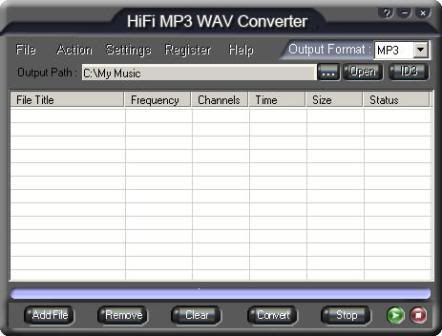
HiFi MP3 WAV Converter v3.00
HiFi MP3 WAV Converter is an ease-to-use application that will directly convert audio format MP3 and WAV from one format to another and supports Normalizing. You can resample your MP3 and WAV files with HiFi MP3 WAV Converter. HiFi MP3 WAV Converter Gives you the option of setting the bitrate and frequency of created files. Supports CBR and VBR. You can convert Batch directly convert between MP3, WAV files.
You can edit the ID3 information for the created files with the ID3-Editor built in HiFi MP3 WAV Converter. You can add entire folder and sub-folders, then convert all the files one by one. And There is a small player built-in and you can pre-listen your song. HiFi MP3 WAV Converter Supports batch conversion. There is a small player built-in and you can pre-listen your song. HiFi MP3 WAV Converter converts audio files digitally-not through the soundcard-which enables you to make perfect copies of the originals.
Download:
http://rapidshare.com/files/131570942/HiFi_MP3_WAV_Converter_3.00_www.rapid-soft.blogspot.com.rar
Atomix Virtual DJ Professional 5.0.7 +Addons+Effects+Skins
The hottest MP3 mixing tool that provides pitch control, full karaoke support and many other features
VirtualDJ is the best MP3 mixing tool, targeting every DJ from bedroom DJs to professional superstars like Carl Cox.
With its breakthrough BeatLock engine, your songs will always stay in the beat, and you can work your mixes incredibly faster than any other DJ could.
The automatic seamless loop engine and the brand new synchronised sampler will let you perform astounding remixes live, with no preparation at all.
The visual representation and the cues allow you to clearly see the song's structure, and never be surprised by a break anymore.
The vinyl controls will let you scratch like on a real turntable, except that with the beatlock engine your scratches will never end out of the beat.
Add to that an infinite number of cue points you can save for each songs, a bunch of wonderful effects automatically beat-synchronised.
Add also several interfaces to suit everybody from the beginner to the professional DJ, the possibility to record your mixes to burn them on CDs, to broadcast on the Internet and have your own radio station, to save your CDs directly in MP3, to use a headphone to preview the songs or an external mixtable to perform in a club.
Lastly, enter the new era of DJs by mixing video clips (DVD, DivX, MPEG...) which you can send on a giant screen.
Virtual DJ brings you all that, in the most easy-to-use way, and at the most affordable price.
Here are some key features of "Virtual DJ 2007":
· Twin independent zero-latency players with:
· Standard controls (play, pause, stop, cue)
· Volume control
· Pitch control (from -34 to +34%)
· 3 band equalizers with Kill + gain
· One-click beat matching and synchronisation (new FAME algorithm)
· BeatLock engine: your songs will always stay in time, and you can work your mixes incredibly faster than any other DJ could
· Automatic beat-matched crossfading
· On-the-fly automatic BPM calculation
· Automatic pitch matching
· Automatic level matching
· Automatic beat matching
· Dynamic beat visualizer for easy "drag'n'drop" beat-matching
· Real scratch simulation
· Virtual scratch: Scratch your mp3 with your bare hand
· Automatic beat-aware LOOP function
· Synchronised sampler with 12 instant slots
· Master Tempo pitch algorithm
· Automatic first beat and last beat detection
· Automatic 4/4 phase detection
· OSC network synchronisation
· Infinite number of beatlocked desks (local multi-instance or network)
· Infinite number of cue points saved per songs
· Beat-aware effect plugins (included: beatgrid, flippin, vocal remover, filter, flanger, backspin, brake, etc...)
· VST effects compatibility
· Video mix with TV output (mix songs and/or video clips !)
· Full karaoke support
· Proprietary of FreeFrame video effects
· Inifite number of video effect simultaneously
· DJ-adapted video transition plugins
· Song database engine with easy-to-use search feature
· CoverFlow or text-only song browsing
· Compatible with iTunes playlists
· ID3 compatibility
· Automatic "filter" folders
· Automatic Hot-Swap of external harddrives
· Ready-to-burn file recording to burn your own mixed CDs
· Broadcast on the Internet
· CD to MP3 encoder
· Optional 3D sound card, 2 sound cards or Y-splitter for real-time monitoring or external mixtable use
· ASIO soundcard compatibility
· Fully customisable (skin engine and shortcut macro enngine)
· External MIDI keyboard compatibility for shortcuts
· Compatibility with most external controllers (DMC2, DAC3, iCDX, TotalControl, BCD2000, DJConsole, etc...)
· Optional automatic mixing: Virtual DJ recognizes the style of the music (techno, hip hop, lounge) and adapt its mix in consequence
Download:
http://rapidshare.com/files/131628218/Atomix.Virtual.DJ.Pro.5.0.7.plus.Addons.Eff_www.rapid-soft.blogspot.comect.Skins.rar


